Go.Learn
- 3.2
- Rating
- 1.00M
- Installs
- Free
- Price

 Analysis by App-foxy
I approached Go.Learn as a work-learning app rather than a general education tool, and that distinction matters. Its job is to make training available away from a desk, which can be useful when a company already uses Docebo for courses and employee development. My experience was less about discovering an independent library of lessons and more about using a mobile doorway into an organization’s existing learning environment. That makes the app practical in the right setting, but much less meaningful if you expect to open it and immediately browse a public catalog.
The app belongs to the business category, is developed by Docebo, and is free to install. It is aimed at Everyone, so the basic presentation is not framed as an adult-only or restricted product. The store summary, “Learning on the go,” describes its purpose accurately, although it does not explain the most important condition: the quality of the experience depends heavily on the learning setup provided by the employer or organization.
How clearly the mobile experience supports different users
I find that Go.Learn’s mobile experience works best when an organization has made its training easy to navigate and learners can choose the right device for each task. In this section, I look at how that balance affects people with different routines and access needs, before considering what helps the app remain useful beyond the first few sessions.
You May Also Like

 Blood Strike: 2.5 Anniversary
Blood Strike’s Loadouts Turn Every Drop Into a Tactical Gamble
A close look at Blood Strike’s custom loadouts: how fast access to signature weapons reshapes its battle royale rhythm, rewards preparation, and narrows the gap between fights.

 Pandora - Music & Podcasts
Pandora’s Music Is Easy to Start, but Harder to Recover
Pandora’s strength is its low-effort path from a seed to a station. Its weak spot is how much confidence it asks you to place in connection, setup, and quiet recovery.

 8 Ball Pool
 Is Built on Rivalries, Rematches, and Routine
A close look at the rivalries, rematches, shared routines, and unanswered safety questions that turn a quick pool match into a persistent mobile community.

 Samsung Music
’s Quiet Strength Is Playing What You Already Own
Its reach comes less from spectacle than from dependable access to a personal library. That simplicity is both the app’s strongest retention engine and its ceiling.

 AccuWeather: Weather Radar
AccuWeather Review: A Quick, Clear Forecast for Everyday Decisions
For everyday plans, the best forecast is the one you can understand quickly. AccuWeather makes rain timing, radar, and local conditions easy to act on, with a few trade-offs.

 Hill Climb Racing
Why Hill Climb Racing Still Turns Crashes Into One More Run
A tiny car, a bumpy hill and one more upgrade: Hill Climb Racing keeps resurfacing because its simple chaos makes every near-miss feel personal.
More From Our News Desk



Readability and navigation in a work-learning context
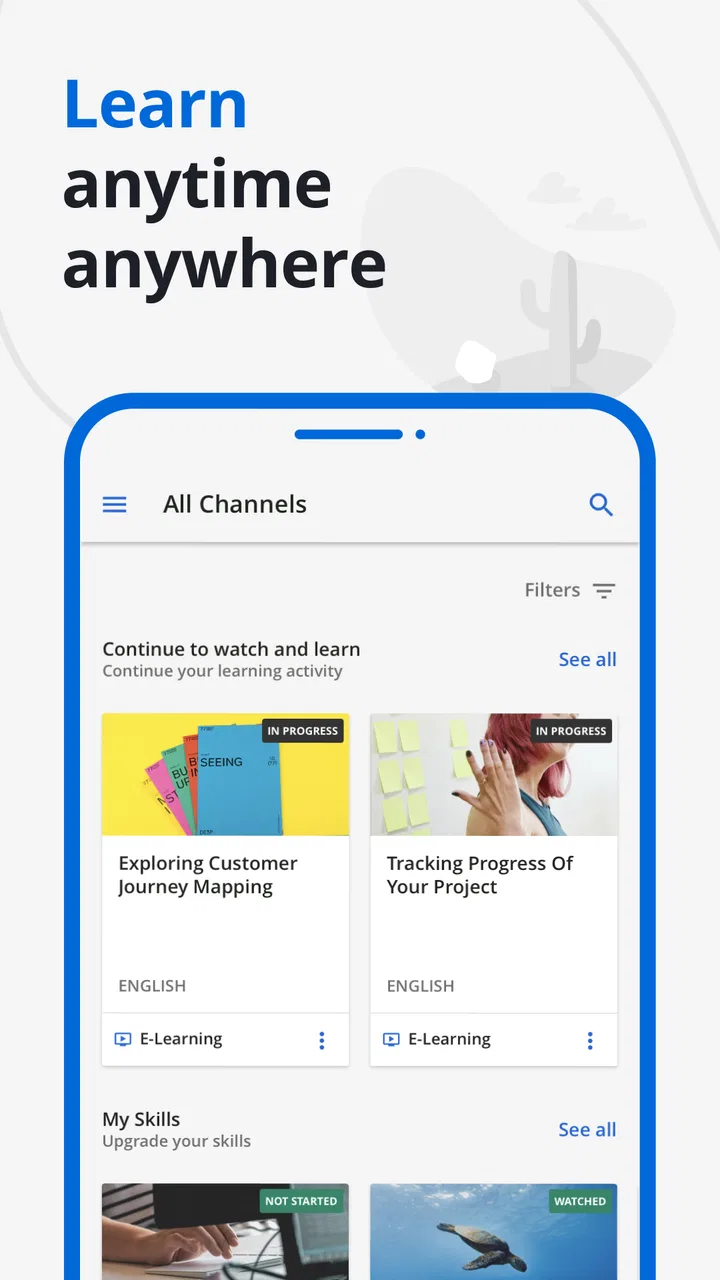
The most comfortable way to use Go.Learn is to treat it as a focused task tool. I would open it with a clear goal, such as checking an assigned course, continuing a lesson, or reviewing learning material during a break. That approach keeps the experience manageable because workplace training apps can become confusing when users are presented with too many categories, announcements, assignments, and progress items at once.
Navigation is most useful when the organization has arranged its content carefully. A well-structured learning area can help a new employee find required material without needing a laptop. A cluttered one can make the app feel harder than it should, especially for people who are unfamiliar with workplace training systems. In other words, the app’s clarity is partly a product decision and partly an administrative decision made by whoever manages the Docebo environment.
I found that short sessions suit the mobile format better than long study blocks. Reading a course instruction, checking what remains, or completing a small section feels natural on a phone. Trying to replace a full desktop training session with the app is less convincing, particularly when the material contains dense text or requires careful comparison between several documents.
For readers who rely on strong visual organization, the practical tip is to use the app with a simple routine: open the assigned area first, identify the next unfinished item, and avoid exploring unrelated sections until the required work is done. This is not a hidden setting, but it is an important workflow insight. A mobile learning interface becomes easier to read when the user reduces unnecessary movement through the content.
The current version is 7.8.2, and the listed minimum operating-system requirement is 10. That makes checking device compatibility an important first step for anyone using an older phone or tablet. The requirement is especially relevant in workplaces where employees may receive different devices or use personal hardware with older software.
Motor and sensory considerations
Mobile access can help people who cannot comfortably remain at a desk for long periods. A phone may be easier to position, carry, or use in short intervals than a fixed computer. It also gives employees more choice about where they complete training, which can be valuable for people whose workday does not happen in a traditional office.
At the same time, a phone is not automatically easier for every user. Small touch targets, scrolling, repeated tapping, and the need to hold a device can create strain for people with limited dexterity or hand fatigue. I would not recommend assuming that mobile access solves those problems. The app can make training more physically flexible, but the comfort of the experience still depends on the device, the course design, and the length of each activity.
Sensory comfort also depends on the material supplied through the learning platform. A short, well-formatted lesson is easier to handle than a crowded page with long passages and frequent interruptions. If a course is visually busy, users may need to enlarge the device interface, change their viewing environment, or move to a larger screen. Those adjustments can help, but they are workarounds rather than proof that every course will suit every learner.
One useful trade-off is that the app’s portability may reduce environmental barriers while increasing attention demands. A learner can move away from a noisy desk, choose a quieter room, or study during a less busy moment. However, learning on a phone in a public place introduces distractions, glare, and interruptions. For someone sensitive to noise or visual activity, the best experience may come from using the app for review and a computer for demanding lessons.
I would also separate content accessibility from interface accessibility. Even if the app opens and navigates smoothly, a course can still be difficult when its wording is dense, its instructions are vague, or its media requires a particular way of seeing or hearing information. That is why I judge Go.Learn as a delivery tool first: it can improve access to training, but it cannot independently guarantee that every lesson has been designed for every ability.
Situational access beyond the office
The strongest use case is an employee who needs to complete training without being tied to a workstation. Imagine a retail worker finishing a shift, sitting in a staff area, and using a phone to continue a required lesson before heading home. That person may not need a full desktop environment; they need a clear route back to the relevant course and enough time to complete a manageable section. Go.Learn fits that situation better than a system that only works conveniently in a browser at a desk.
It can also suit traveling staff, field teams, and employees who rotate between locations. A mobile learning app reduces the friction of waiting until someone returns to an office computer. That matters when training is part of onboarding or when a worker needs to review information between practical tasks. The benefit is not that the phone makes every lesson better. The benefit is that the lesson is more available at the moment it becomes useful.
There is a less obvious limitation here: availability does not equal suitability. A person in a busy workplace may technically be able to open a course but lack the concentration to absorb it. I would use the app for a quick continuation or review in that setting, then reserve complex learning for a quieter place. This distinction helps prevent the common mistake of measuring mobile learning only by whether the app launches.
Another realistic scenario is a new employee who receives several training assignments at once. A mobile app can reduce the psychological barrier of starting because the learner can handle one item during a short pause instead of waiting for a large block of free time. The risk is losing track of priorities if the organization’s course structure is not clear. I would keep the assigned sequence or workplace instructions nearby and use the app as the execution tool, not as the sole source of planning.
For people with inconsistent access to a computer, this flexibility is the main reason to consider the app. For someone who already has a comfortable desktop learning setup and rarely needs training away from work, the mobile version may feel optional rather than essential.
What it does better than usual alternatives
Compared with opening a workplace learning portal in a mobile browser, a dedicated app feels more appropriate for repeated access. A browser can be useful for occasional viewing, but it may involve finding the correct site, signing in again, or managing several open pages. Go.Learn is built around returning to learning as an ongoing activity, so it makes more sense for employees who check assignments regularly.
Compared with a general video-learning service, it is also more closely connected to organizational training. A public education app may offer a broader range of independent subjects, but it usually does not represent the same workplace-specific learning path. Go.Learn is the better choice when the employer’s courses and training structure are the reason for using the app in the first place.
A desktop browser remains the better alternative for long reading, complex forms, detailed reference work, or any lesson that benefits from a larger display and a physical keyboard. I would not choose the app simply because mobile sounds more modern. I would choose it when portability, quick continuation, and access to an existing Docebo learning environment outweigh the comfort and precision of a computer.
This comparison also explains the average rating of 3.2 from around three thousand ratings. That score suggests a mixed experience rather than a universally effortless one, which matches my view: the app can be genuinely useful in a supported workplace, but its value is not independent of the content and setup behind it. It has more than one million installs, so it is clearly used at significant scale, yet scale alone does not remove the need for good course design or thoughtful administration.
Remaining barriers and practical friction
The first barrier is account context. Go.Learn is not the kind of app I would install expecting a self-contained learning journey. Its usefulness begins when an organization has connected the learner to the appropriate training environment. If you are an individual looking for open courses, personal skill development, or a broad catalog to explore at your own pace, this is probably the wrong starting point.
The second barrier is inconsistency between courses. One lesson may work well on a phone while another may feel cramped, tiring, or difficult to follow. That variation is especially important for users with visual, motor, attention, or sensory needs. The app can provide the route to the material, but the people creating the material still determine whether the route is comfortable and understandable.
A third issue is the difference between quick access and deep work. Mobile learning encourages fragmented sessions, which is helpful for small tasks but not always ideal for retention. If training includes complicated procedures, sensitive decisions, or substantial reading, I would avoid rushing through it merely because the app makes it available. A larger screen, notes, and uninterrupted time may produce a better result.
There is also a social and environmental barrier. Some employees may be expected to learn during breaks or between duties, but not everyone has the same quiet space, device quality, or ability to concentrate in those moments. A responsible workplace should not treat mobile availability as permission to push all training into personal time. The app supports flexibility; it should not be used to hide poor scheduling or unequal access to suitable equipment.
Before relying on it, I would ask a manager or training administrator three practical questions: which courses are intended for mobile use, whether employees may choose a computer when a lesson is difficult on a phone, and how to request a more suitable format when a course creates a barrier. Those questions are more useful than assuming the app alone will solve every access problem.
Who should use it, and who should skip it
I would recommend Go.Learn to employees whose organizations already use Docebo and who need a convenient way to continue assigned learning away from a desk. It is particularly suitable for people with changing work locations, limited computer time, or a preference for short study sessions. It can also help managers encourage steady progress when training does not need to happen in one long sitting.
I would be more cautious if you have a strong need for large-screen reading, extensive typing, precise pointer control, or long uninterrupted study. In those cases, the app may still be useful as a companion, but I would not make it the only learning route. The same applies if your organization has uploaded poorly structured material. A mobile interface cannot turn confusing instructions into clear teaching.
People looking for independent courses should skip it unless they already know that their employer, school, or organization provides access. The free price makes trying it easy, but free installation does not mean it replaces a public learning marketplace. Its purpose is organizational learning on a mobile device, not unrestricted discovery.
My inclusive verdict
After using Go.Learn with an accessibility-focused eye, I see a useful but conditional product. Its clearest strength is situational access: it gives workplace learners another way to reach training when a computer is unavailable or inconvenient. That can make a real difference for staff who move around, work varied schedules, or need to complete learning in short intervals.
Its main weakness is that the mobile shell cannot control every factor that determines inclusion. Course layout, wording, media, device condition, screen size, concentration, and organizational expectations all affect the result. For some users, the app will be a welcome bridge to training; for others, it will be a secondary option beside a desktop or a more deliberately adapted learning format.
My recommendation is to treat it as a flexible companion to workplace learning, not as a universal replacement for every other format. If your organization’s Docebo courses are concise, clearly organized, and suitable for mobile viewing, Go.Learn can make required learning easier to fit into real life. If the material is dense or your physical and sensory needs demand more control, ask for a larger-screen or alternative workflow instead of forcing yourself through an uncomfortable session.
In short, I would install it when access to an existing business learning environment is the goal. I would not install it expecting a standalone education library. The best experience comes from matching the app to the learner, the course, and the situation rather than treating mobile access as a complete accessibility solution.
FAQs for Go.Learn
01What is Go.Learn and what can I use it for?
Go.Learn is an innovative mobile learning app designed to enhance professional development and skill acquisition through interactive courses. It offers a wide range of educational content, including videos, quizzes, and assignments, tailored to different learning preferences. Users can track their progress and engage with content at their own pace, making it ideal for anyone looking to improve their skills on the go.
02Is Go.Learn available for both Android and iOS devices?
Yes, Go.Learn is available for download on both Android and iOS platforms. Users can find the app on the Google Play Store for Android devices and the Apple App Store for iOS devices. This ensures a broad accessibility, allowing learners to access educational content regardless of their device preferences.
03Does Go.Learn require an internet connection to function?
While Go.Learn offers some offline capabilities, a stable internet connection is recommended for the full experience. This includes downloading new courses, accessing updated content, and participating in interactive elements like quizzes. Offline functionality is limited to viewing previously downloaded materials, making online access preferable for a comprehensive learning journey.
04Are there any subscription fees associated with Go.Learn?
Go.Learn offers both free and premium subscription plans. The free version provides access to a limited range of courses and features, while the premium subscription unlocks the full range of content, advanced features, and personalized learning paths. Users can choose a plan that best suits their learning needs and budget.
05How does Go.Learn ensure the quality of its educational content?
Go.Learn collaborates with industry experts and educational professionals to curate high-quality content. Courses are regularly updated to reflect the latest trends and information in various fields. Additionally, user feedback is actively sought to continually refine and enhance the learning materials, ensuring that users receive the most relevant and effective education possible.
Pros
- User-friendly interface for easy navigation.
- Rich content library with diverse topics.
- Offline access to courses available.
- Regular updates with new learning materials.
- Interactive quizzes enhance learning experience.
Cons
- Limited language options for non-English users.
- No option for personalized learning paths.
- Requires stable internet for some features.
- Notifications can be overwhelming at times.
- Subscription needed for premium courses.

Go.Learn
Gallery